In this article
Printing can turn a moving screen into something easier to mark and compare. It can also quietly remove information. A footnote may land on another sheet, a wide table may lose a column and a colored label may disappear in grayscale. A useful printout is therefore a small editing decision: which parts must stay together for this reading task?
You are not producing a new official document. You are preparing a reading copy. Keep that distinction visible, especially if you enlarge text, select pages or add handwritten explanations. The source’s title and version help the copy remain connected to the material it came from.
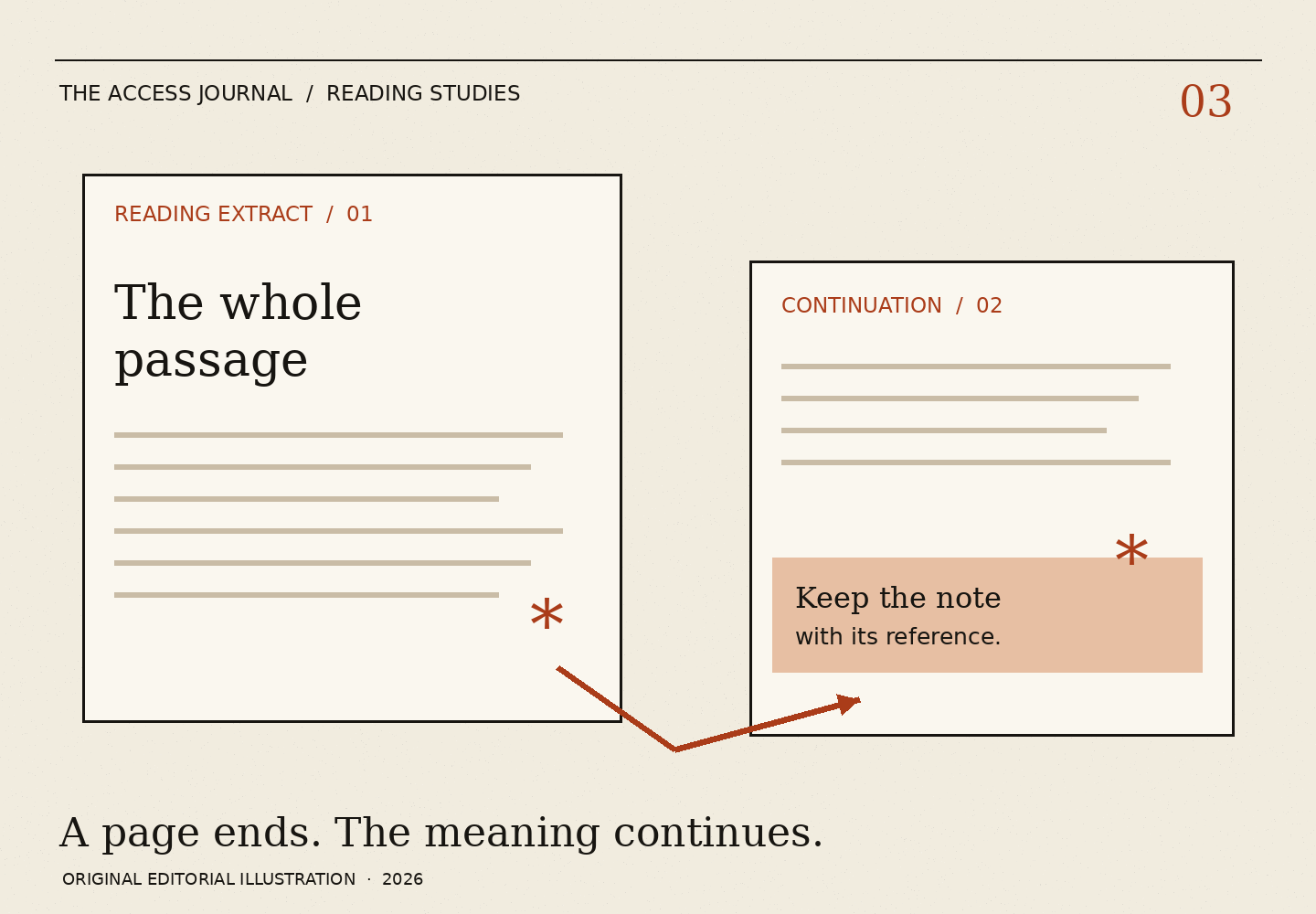
Preview the whole unit of meaning Before printing, identify the passage’s dependencies. These may include a heading, the preceding definition, the next paragraph or a note below a table. A page boundary is a printer’s boundary, not necessarily the end of an idea. Check the preview for sentences or rows that continue.
For a short task, it can be reasonable to print only the relevant section, provided the needed qualifications come with it. Mark a selected extract as an extract. A reader who later finds the sheet should not mistake it for the entire document. If a decision depends on the rest of the material, a selective printout is only a starting point.
Digital.gov’s design guidance describes how headings, lists and well-chosen emphasis can support understanding. Our print-copy method applies that general observation to a reader’s working materials. It does not establish that the original document was designed well or that a reformatted version preserves every requirement.
Run a four-edge check Inspect the top, bottom, left and right edges of the preview. At the top, look for the title or section label. At the bottom, check for a cut-off line, note or continuation. At the left and right, check table labels and long addresses. A preview that looks tidy at a glance can still be missing the last word of a condition.
Then check one passage against the screen. Pick a paragraph with a qualification rather than a simple introductory sentence. If the print version changes line order or leaves out a symbol, investigate before using the rest. This is a sample check, not proof that every page is intact.
Browser printing and reader views differ by software and document. W3C’s customization guidance describes options that can change how text is displayed. It does not promise a particular printed result. If an available setting makes the page less complete, reverse it or choose another way to obtain a usable copy.
Leave room for your questions A reading copy should have enough space to distinguish a note from the original text. Put a question mark beside a passage and write the question in the margin or on a separate sheet. If you cross out a word as part of a paraphrase exercise, label the change as your own explanation. Do not make an altered sentence look like the source’s wording.
Use a small number of marks with stable meanings. For example, underline a term to look up, circle a reference to another section and put a question mark beside an unresolved relationship. If every sentence is highlighted, the highlighting no longer helps you choose where to return.
Avoid color as the only way to distinguish meanings. A photocopy, grayscale printer or another reader may lose that difference. Short labels such as “definition” and “question” can carry the same distinction without depending on the ink. The labels also help if someone reads the sheet aloud.
The missing continuation: a fictional example Ari prints the first page of an invented information sheet because that page contains the sentence they want to discuss. The print preview shows a small reference mark after the sentence. The note itself begins on page two. Ari adds the second page and marks the connecting reference on both sheets.
The extra page changes the reading task. Ari had planned to ask what the sentence meant. Now the question is whether the note qualifies one example or the whole section. Keeping the continuation produces a more precise question without answering it prematurely.
Ari labels the packet “reading extract” and adds the source title and date viewed. A friend who helps later can locate the same section. No account record is printed, and the exercise does not involve signing or submitting anything. The paper serves the reader’s understanding rather than becoming a substitute for an official instruction.
Store only the copy you need A public educational page and a personal payment document require different care. For private material, consider who can see the printer, output tray, saved file or shared device. Do not use a public print route merely because it is convenient without considering what it receives. This journal does not accept documents for printing or conversion.
When the task is finished, decide whether the reading copy still has a purpose. Keep the original source reference if it helps, and handle any private pages through your usual secure practices. Removing optional reading-position storage on this site does not remove downloaded files or paper copies.
End by checking that the note and its source still travel together. A clear question without its passage can be hard to answer. A passage without its qualification can be misleading. The best paper packet is the smallest complete unit that supports your next reading step.